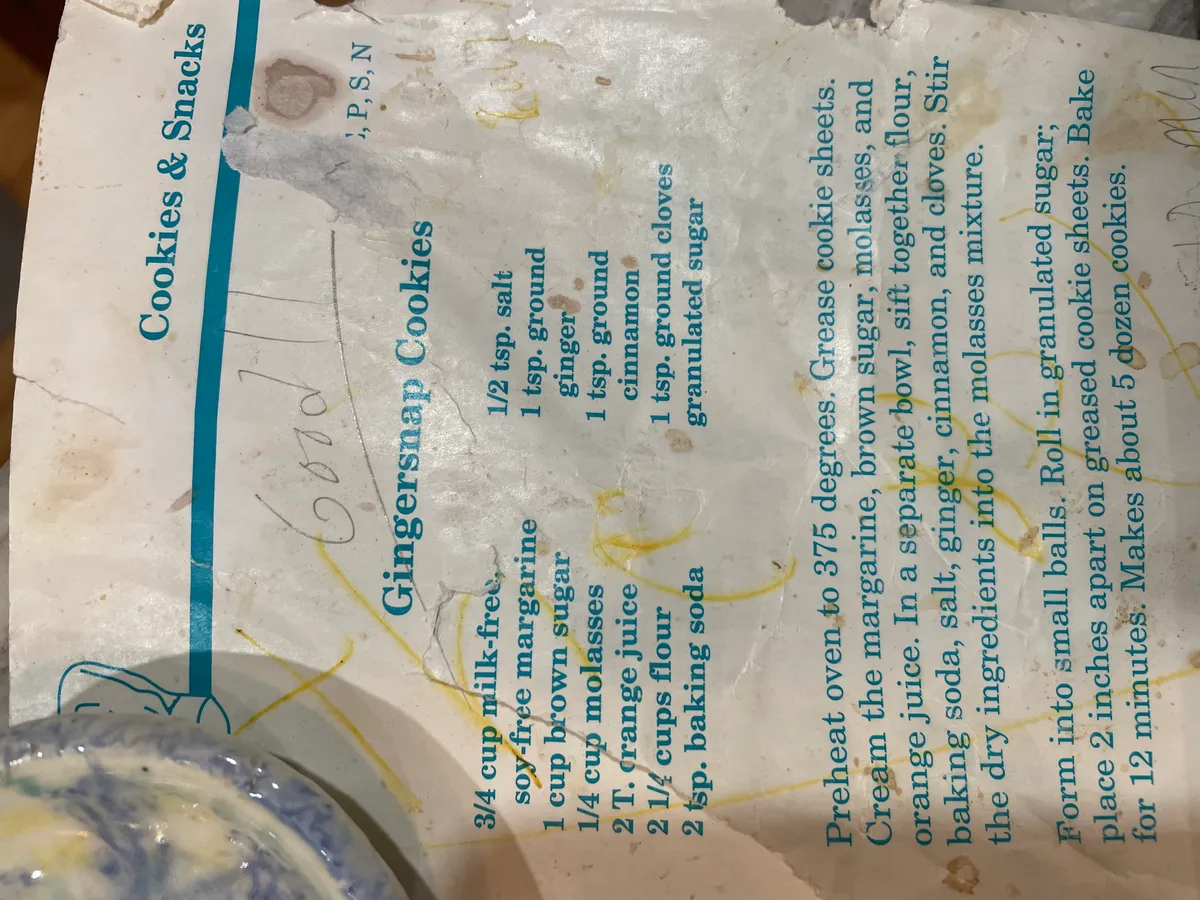
Gingersnap Cookies (from a milk-free, soy-free recipe card)
A recipe card. Milk-free, soy-free, egg-free gingersnaps, with “good” written across the top in pen.
It’s from the Cookies & Snacks section of an allergen cookbook. The corner is stamped with the book’s free-from legend, P, S, N, and the recipe uses milk-free, soy-free margarine with no eggs.
I photographed the card, ran a first pass through Apple’s Vision OCR, then checked the output against the photo line by line. The recipe below keeps the card’s wording and adds metric volume and weight equivalents.
Amount scaler
Gingersnap batch scaler
| Amount | Ingredient |
|---|---|
| ¾ cup | milk-free, soy-free margarine |
| 1 cup | brown sugar, packed |
| ¼ cup | molasses |
| 2 Tbsp | orange juice |
| 2¼ cups | all-purpose flour |
| 2 tsp | baking soda |
| ½ tsp | salt |
| 1 tsp | ground ginger |
| 1 tsp | ground cinnamon |
| 1 tsp | ground cloves |
| ¼ cup | granulated sugar (for rolling) |
Showing ×1 batch in US units.
Verbatim transcription
Ingredients — as written on the card, with metric equivalents (volume · weight):
- ¾ cup milk-free, soy-free margarine — 177 ml · 170 g
- 1 cup brown sugar, packed — 237 ml · 213 g
- ¼ cup molasses — 59 ml · 85 g
- 2 Tbsp orange juice — 30 ml · ~31 g
- 2¼ cups all-purpose flour — 532 ml · 270 g
- 2 tsp baking soda — 10 ml · 12 g
- ½ tsp salt — 2.5 ml · 3 g
- 1 tsp ground ginger — 5 ml · ~2 g
- 1 tsp ground cinnamon — 5 ml · ~3 g
- 1 tsp ground cloves — 5 ml · ~2 g
- granulated sugar, for rolling — ~¼ cup · ~50 g
Method
- Preheat oven to 375°F (190°C). Grease cookie sheets.
- Cream the margarine, brown sugar, molasses, and orange juice.
- In a separate bowl, sift together the flour, baking soda, salt, ginger, cinnamon, and cloves.
- Stir the dry ingredients into the molasses mixture.
- Form into small balls. Roll in granulated sugar, then place 2 inches apart on the greased cookie sheets.
- Bake for 12 minutes.
Makes about 5 dozen cookies.
How it rises without eggs or butter
The baking soda is the leavener. Sodium bicarbonate needs moisture and acid to release carbon dioxide. Baking Sense lists molasses and citrus juice as acidic ingredients that trigger the reaction, and notes that unneutralized soda can leave a soapy, bitter flavor.
Here, the molasses and orange juice do that job without eggs or dairy. The gram weights above come from King Arthur’s ingredient weight chart.
Digitizing the card- Apple Vision OCR
I used Apple’s Vision framework (VNRecognizeTextRequest) for the first OCR pass and checked the result manually.
sipsto turn the iPhone HEIC into a PNG for Vision:sips -s format png IMG_4509.HEIC --out recipe.png- Run the Swift program below over the PNG.
- Reconcile its output against the photo by eye.
Apple Vision OCR in ~40 lines of Swift (VNRecognizeTextRequest, accurate mode)
import Foundation
import Vision
import AppKit

guard CommandLine.arguments.count > 1 else {
    FileHandle.standardError.write("usage: ocr <image>\n".data(using: .utf8)!)
    exit(1)
}
let path = CommandLine.arguments[1]
guard let img = NSImage(contentsOfFile: path),
      let cg = img.cgImage(forProposedRect: nil, context: nil, hints: nil) else {
    FileHandle.standardError.write("cannot load image\n".data(using: .utf8)!)
    exit(1)
}

let request = VNRecognizeTextRequest { req, _ in
    guard let obs = req.results as? [VNRecognizedTextObservation] else { return }
    // Sort top-to-bottom, then left-to-right, so the reading order survives.
    let sorted = obs.sorted { a, b in
        if abs(a.boundingBox.midY - b.boundingBox.midY) > 0.02 {
            return a.boundingBox.midY > b.boundingBox.midY
        }
        return a.boundingBox.midX < b.boundingBox.midX
    }
    for o in sorted {
        if let top = o.topCandidates(1).first { print(top.string) }
    }
}
request.recognitionLevel = .accurate
request.usesLanguageCorrection = true
request.customWords = ["molasses", "tsp", "tbsp", "cloves", "granulated", "margarine"]

let handler = VNImageRequestHandler(cgImage: cg, options: [:])
try handler.perform([request])
Vision returns text observations with normalized bounding boxes, not a finished reading order. Sorting by midY (descending- Vision’s origin is bottom-left) and then midX rebuilds the card order; customWords keeps cooking terms like molasses from being autocorrected away.
That produced the card text in one pass- title, ingredient columns, method paragraph, and fractions.
Footer: building it with the LLVM/Swift toolchain
No package manager involved. The OCR API lives in Apple’s Vision.framework, and the compiler is the Swift toolchain from Xcode command-line tools.
# What's under the hood — swiftc is an LLVM frontend, bundled with clang:
$ swift --version
Apple Swift version 6.3.2 (swiftlang-6.3.2.1.108 clang-2100.1.1.101)
Target: arm64-apple-macosx26.0
Two ways to run it. Interpret the script:
swift ocr.swift recipe.pngOr compile an optimized native binary:
# -O turns on LLVM's optimizer; link the two system frameworks we touch.
swiftc -O ocr.swift -o ocr -framework Vision -framework AppKit
./ocr recipe.png
That swiftc invocation is the whole pipeline: Swift source → SIL (Swift’s own IR) → LLVM IR → the LLVM backend emits arm64 machine code for the arm64-apple-macosx target, linked against the system frameworks. The bundled clang shares the same LLVM.
Related Posts
Jess Sullivan

Full stack engineer, musician, and birdwatcher based in Lewiston, ME & Boston, MA. I build infrastructure tooling, digital automata, hack upon compilers, love learning new languages, futz with hardware, and maintain a lot of fun projects here and elsewhere.

Merged upstream
Sponsoring
Ventures
Topic Network